All Insights
Best Enterprise Search Tools for 2026: The Complete Guide

By Chris Weaver
TL;DR: Enterprise search in 2026 is AI-powered, permission-aware, and expected to deliver answers, not just links. The best tools combine semantic understanding, RAG (retrieval-augmented generation), and broad connector coverage. The frontier goes further: search plus AI chat, deep research, and custom agents, all grounded in your company's data. Your choice depends on how many data sources you need to connect, whether you need self-hosted deployment, and how much of the AI stack you want in one platform. This guide covers 11 tools worth evaluating.
Originally researched in February 2026 and refreshed in May 2026 for structure and recommendations.
What Is Enterprise Search in 2026?
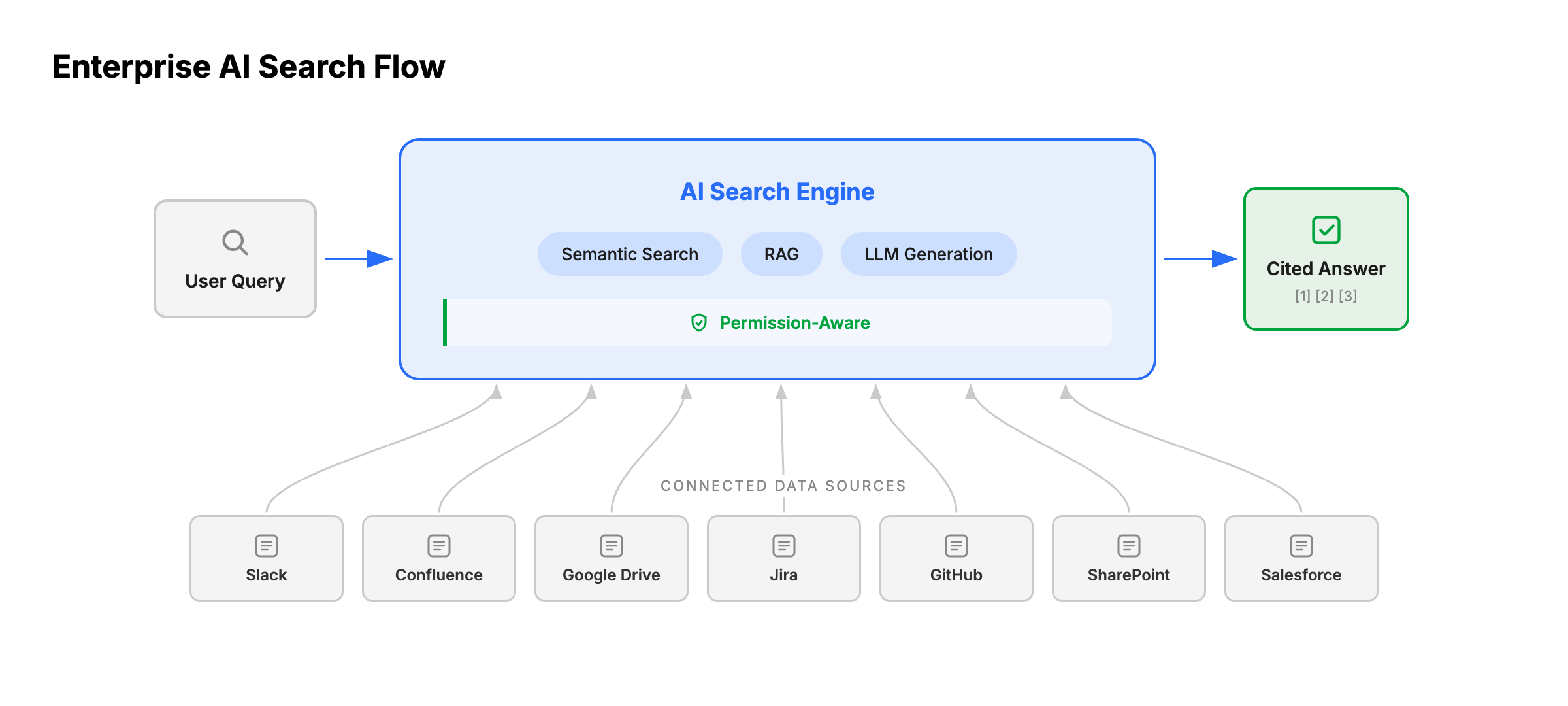
Enterprise search has changed. The keyword-matching enterprise search tools of the 2010s (searching Confluence titles or SharePoint file names) are gone. In 2026, enterprise search means an AI layer that sits across all your company's tools and returns answers grounded in your actual data.
The shift happened because of three converging trends:
- Retrieval-augmented generation (RAG) became the standard architecture for grounding AI in company data. Instead of relying on a general-purpose LLM's training data, RAG retrieves relevant internal documents and feeds them to the model at query time.
- Connector ecosystems matured. Leading platforms now plug into 40-100+ SaaS tools (Slack, Confluence, Jira, Google Drive, SharePoint, Salesforce, GitHub) and sync in real time.
- Permission-aware AI became non-negotiable. If your sales rep asks a question, they should only get answers from documents they have access to. The best platforms inherit permissions directly from source systems.
The result? AI-powered enterprise search in 2026 retrieves and synthesizes information from across your company's tools, delivers cited answers, and respects access controls throughout. Modern solutions add multi-model AI chat, multi-step research, and custom agents that can take action on the information they find.
What to Look for in Enterprise Search
Before comparing tools, here is our checklist for the most important evaluation criteria.
- Connector breadth and depth: How many data sources can you connect? Does the tool sync in real time or on a schedule? Can it handle both cloud SaaS and on-premise systems?
- AI quality: Does it use index-based RAG or only MCP/API? Can it summarize, synthesize across sources, and cite its answers? Does it support follow-up questions?
- Permission inheritance: Does it respect the access controls from your source systems, or does everyone see everything?
- Deployment model: Cloud-only, self-hosted, or both? This matters enormously for regulated industries, data sovereignty, and cost control.
- Model flexibility: Are you locked into one LLM provider, or can you bring your own model?
- Customizability: Can you build custom connectors for internal systems? Modify the platform to fit your workflows? Adapt the product when it doesn't do what you need out of the box?
- Security and compliance: SOC 2, GDPR, HIPAA compatibility, encryption, audit trails.
- Pricing transparency: Per-seat, usage-based, or opaque "contact sales"? Can you start small and scale?
- Enterprise features: SSO, RBAC, analytics dashboards, admin controls, white-labeling.
What Is Onyx?
Onyx is an open-source enterprise AI platform that includes enterprise search, AI answers, agents, and deep research. In this category, Onyx is strongest when search needs to work across many tools, respect source permissions, support self-hosted or air-gapped deployment, and stay flexible about which LLM powers the experience.
Unlike search infrastructure tools, Onyx ships with the application layer and connectors already built. Unlike closed enterprise search vendors, it gives technical teams code access, APIs, model choice, and deployment control.
Feature Comparison Table
| Tool | AI Search & RAG | Self-Hosted | Model Choice | Open Source | Connectors | Starting Price | Best For |
|---|---|---|---|---|---|---|---|
| Onyx | Yes | Yes | Any LLM | Yes (MIT) | 40+ | Free | Full AI platform: enterprise search + AI chat + agents, self-hosted or cloud |
| Glean | Yes | Limited | 15+ LLMs | No | 100+ | ~$50/user/mo | Large enterprises wanting turnkey search without customization needs |
| Coveo | Yes | No | No | No | 15+ | $600/mo base | E-commerce and customer-facing search |
| Guru | Yes | No | No | No | 60+ | $30/user/mo | Knowledge management with verification workflows |
| Google Vertex AI Search | Yes | No | No | No | Limited | Usage-based | Google Cloud-native organizations |
| Microsoft Copilot | Yes (M365) | No | No | No | 100+ (M365-centric) | $21-30/user/mo + M365 | All-in Microsoft 365 shops |
| Elastic | Search infra | Yes | N/A | Partial (AGPL) | 30+ | Free (self-managed) | Engineering teams building custom search |
| GoSearch | Yes | No | Limited | No | 50+ | Free ($12/user/mo Pro) | Mid-market teams wanting affordable Glean alternative |
| Kore.ai | Yes | Yes | No | No | 60 + | Contact sales | AI-first enterprise search with virtual assistants |
| ChatGPT Enterprise | Partial | No | No | No | 10+ | Contact sales | Teams already paying for ChatGPT that want light enterprise search |
| Algolia | Yes | No | No | No | API-based | Free (limited) | Developer-built site and app search |
Note on connectors: different vendors have a wildly different definitions of what counts as a "connector." I advise you carefully research claims about number of supported connectors in your procurement journey.
Why Claude Cowork Isn't on This List
One popular AI tool is missing from this guide: Anthropic's Claude Cowork (which added enterprise search features in February 2026). Claude Cowork lets you connect workplace apps and ask questions about company data, but it is not an enterprise search system. It is an AI chat product that bolts on data access through MCP (Model Context Protocol) connections at query time.
Why that matters: Enterprise search platforms (Onyx, Glean, Coveo, etc.) build and maintain a persistent data index. They continuously sync your documents, chunk and embed the content, and store it in a searchable vector and keyword index. When you ask a question, the system retrieves from this pre-built index using hybrid search (semantic + keyword), then passes the most relevant chunks to an LLM for answer generation.
Claude Cowork works differently. It connects to your tools via MCP servers and fetches data live at query time. There is no persistent index. The LLM decides which API calls to make, retrieves what it can within the context window and latency constraints, and generates an answer from whatever comes back. The system is constrained by what each API returns for a given query, how many calls the model makes, and context window limits. Unlike index-based search, it has not already ranked and organized your full knowledge base.
Note that ChatGPT Enterprise (covered below) also started as a pure API-at-query-time product, but OpenAI has since added indexing for a handful of connected sources. That partial indexing earns it a spot on this list, though the coverage is far narrower than purpose-built enterprise search platforms.
In our own benchmark of agentic RAG systems on real workplace questions (methodology and full results at the link), we tested against a corpus of 220,000 real, internal documents across GitHub, Gmail, Google Drive, Slack, and more. Onyx won 64% of head-to-head comparisons against ChatGPT Enterprise and 68% against Claude's enterprise search. The biggest gaps showed up on questions requiring retrieval of specific internal documents that API-based or lightly indexed systems could not find.
Claude is a strong AI assistant, but it is not an enterprise search platform.
Detailed Reviews
1. Onyx
What it is: A full AI platform that combines search, multi-model AI chat, deep research, and custom agents with MCP tool use. Open source (MIT license), so teams can build custom connectors, tailor workflows, and modify the platform to fit their exact needs. Available self-hosted or as managed cloud.
Connectors: 40+ including Slack, Confluence, Jira, Google Drive, SharePoint, Salesforce, GitHub, Notion, HubSpot, Zendesk, and more. Connectors sync automatically and inherit permissions from source systems.
AI capabilities: Onyx uses hybrid (keyword + semantic) search with advanced RAG and LLM-based knowledge graphs. It supports any LLM (OpenAI, Anthropic, Gemini, DeepSeek, Llama, Mistral, Qwen) via cloud APIs or local inference through any self-hosted provider like Ollama, LM Studio, or vLLM. Beyond search, Onyx includes deep research (multi-step agentic research over internal documents), custom AI agents with MCP tool use, code interpreter, and web search.
Deployment: Self-hosted (Docker or Kubernetes), managed cloud, or enterprise self-hosted with dedicated support. Supports fully air-gapped deployments with local LLMs and zero internet connectivity.
Security: SOC 2 Type II certified, GDPR compliant, granular permission inheritance, fully auditable open-source code.
Pricing: Free community edition (fully functional), $20/user/month for Business plan (annual billing) or $25/user/month (monthly billing). Enterprise Edition exists for companies seeking SLAs, managed or self-hosted instances that scale to millions of documents, and custom development and deployment support.
Best for: Organizations that want the full AI stack (search + chat + deep research + agents) in one platform, with the flexibility to self-host or run in the cloud. Teams in regulated industries (defense, aerospace, healthcare, finance, EU enterprises) that need data sovereignty, model flexibility, or air-gapped deployment. Companies that want full control over their AI infrastructure, from model selection to data residency to customizing the platform itself.
Trade-offs: Fewer pre-built connectors than Glean or GoSearch (40+ vs 100+), though the most common enterprise apps are covered, and custom connectors can be built on the open-source codebase. Self-hosted deployment requires Docker or Kubernetes knowledge with comfort for infrastructure procurement, costs, and management. The managed cloud option removes these requirements.
Verdict: The most flexible full-stack option: search, chat, research, and agents on any infrastructure with any LLM.
2. Glean
What it is: The market leader in enterprise AI search. Glean connects to 100+ workplace apps and delivers AI-powered answers, summaries, and task automation through its assistant and agents.
Connectors: 100+ enterprise app connectors, the broadest in the market. If you use it, Glean probably connects to it.
AI capabilities: Generative AI-powered summaries, personalized results via a knowledge graph, Glean Agents for task automation, and Glean Protect for permission-aware search. Glean Model Hub provides access to 15+ LLMs with per-step model selection. Strong RAG implementation with real-time indexing.
Deployment: Primarily cloud-hosted. On-premises deployment available through a partnership with Dell (announced May 2025), and a "Cloud-Prem" model where the tenant runs in the customer's own cloud environment. These are vendor-managed deployments, not open-source self-hosting.
Pricing: Not published. We estimate roughly $50/user/month based on available, 3rd party information on the web.
Best for: Large enterprises (1,000+ employees) in tech, finance, and professional services that are comfortable with cloud deployment and have the budget for a premium solution.
Trade-offs: On-premises option exists but is limited to Dell hardware and vendor-managed; no open-source self-hosting on arbitrary infrastructure. Not open-source, so you cannot build custom connectors or modify the platform to fit your workflows. Expensive. Cannot operate in fully air-gapped environments.
Verdict: The market leader for large enterprises that want turnkey deployment and the broadest connector library, if budget is not a constraint.
3. Coveo
What it is: An AI-powered relevance platform focused on enterprise search, recommendations, and personalization, with particular strength in commerce and customer-facing search.
Connectors: 17 native connectors plus a crawling module for on-premises content.
AI capabilities: Semantic search, generative answering, content personalization, AI recommendations, and merchandising. Strong machine learning for relevance tuning.
Deployment: Cloud-native SaaS. The Crawling Module can be deployed on-premises to index local content, but the core platform runs in Coveo's cloud.
Pricing: Not published. Consumption-based pricing with free trial available.
Best for: E-commerce companies, B2B digital experience teams, and customer support organizations needing search personalization. Less suited for internal AI knowledge management.
Trade-offs: Focused on customer-facing search, not internal AI chat and agents. Very few natie connectors. No multi-model AI chat or agent-building capabilities.
Verdict: Strong for customer-facing and e-commerce search, but not built for internal AI knowledge management.
4. ChatGPT Enterprise
What it is: OpenAI's enterprise tier of ChatGPT, which adds workplace data connections, admin controls, and compliance features on top of the ChatGPT interface. OpenAI has gradually expanded from pure API-at-query-time access to indexing a handful of connected sources, giving it basic enterprise search capabilities alongside its AI chat.
Connectors: Connected apps for Google Drive, SharePoint, GitHub, Confluence, and a few other sources. The connector list is growing but remains small compared to purpose-built enterprise search platforms. Connections are configured at the admin level and made available to users based on workspace settings.
AI capabilities: Full access to OpenAI's latest models (GPT-5.4, GPT-5.3 Codex) with extended context windows. Connected sources are partially indexed, meaning ChatGPT can search over synced content rather than relying entirely on live API calls. However, the indexing is shallow compared to dedicated search platforms: it covers a subset of connected sources, and retrieval quality depends on how well OpenAI's indexing handles your specific data. Custom GPTs and the GPT Store allow teams to build internal tools.
Deployment: Cloud-only. No self-hosted option.
Security: SOC 2 Type II compliant, data not used for model training, admin console with usage analytics. However, connected apps introduce significant data security risks. ChatGPT retrieves data based on the user's existing permissions in each connected source, but most organizations have not audited or remediated excessive permissions across their cloud apps. The result: ChatGPT's "blast radius" is determined by how well your organization has locked down access controls in every connected system. Data that was exported to a shared SharePoint site, forwarded in an email, or sitting in a broadly accessible folder becomes surfaceable through ChatGPT, even if the user would never have found it through normal workflows. Native role-based access controls for connector administration are still maturing, and security teams currently lack visibility into which files are accessed, what prompts drive retrieval, and how responses synthesize data across sources.
Pricing: Not published. Enterprise tier requires annual contracts with custom pricing; estimated at $50-60/user/month based on available information. ChatGPT Team ($25-30/user/month) offers a subset of features without the admin controls and compliance certifications.
Best for: Organizations already paying for ChatGPT Enterprise that want to add light enterprise search without adopting a separate platform. Teams where AI chat is the primary use case and search across a few key data sources is secondary.
Trade-offs: The indexing covers only a handful of connected sources, far fewer than Onyx, Glean, or GoSearch. For sources that are not indexed, ChatGPT falls back to live MCP connections with the retrieval limitations that implies. Data security is the bigger concern: connecting internal data sources amplifies the risk of excessive permissions, since ChatGPT can surface and synthesize sensitive documents that users technically have access to but were never meant to see. Without centralized monitoring of connector usage and prompt activity, security teams are flying blind. No self-hosted option. No model choice (OpenAI models only). No open source. Pricing is opaque and requires annual commitment.
Verdict: A reasonable option if your team already uses ChatGPT internally and you need search across a few key sources like Google Drive and GitHub, but audit your permissions carefully before enabling connectors. For serious enterprise search across many data sources, purpose-built platforms will deliver better retrieval quality, broader coverage, and more mature permission inheritance.
5. Guru
What it is: An AI-powered knowledge management platform that centralizes company information into searchable "knowledge cards" integrated into Slack, Teams, and Salesforce.
Connectors: Hundreds of integrations across workplace tools. Strong in Slack and Teams.
AI capabilities: AI-powered search, Knowledge Agents for team-specific answers, Guru GPT (ChatGPT integration for internal knowledge), and automated verification reminders to keep content fresh.
Deployment: SaaS only. No self-hosted option.
Pricing: $30/user/month billed monthly.
Best for: Knowledge management teams at mid-market companies wanting to centralize tribal knowledge. Customer support and sales enablement teams that need verified, curated knowledge.
Trade-offs: Not a full AI platform; limited to knowledge management. No self-hosted option. No model choice. No deep research or code interpreter. The credit system for AI usage can add up.
Verdict: Best for teams that need curated, verified knowledge management rather than broad AI-powered search.
6. Google Vertex AI Search
What it is: Google Cloud's enterprise AI search service, delivering semantic search, RAG, and generative answers within the Google Cloud Platform.
Connectors: Data connectors for Jira, Confluence, Salesforce, and other enterprise apps, plus crawlers for websites and intranets.
AI capabilities: Google-quality semantic search and ranking, generative answers with follow-ups, RAG capabilities, and multimodal search. Part of the Vertex AI Agent Builder platform.
Deployment: Google Cloud Platform only. Can access on-premises data through Private Service Connect, but the search engine itself is cloud-hosted.
Pricing: Usage-based (per query/request). Free tier with 10K queries/month. Enterprise pricing via custom quotes.
Best for: Organizations already on Google Cloud that want to add AI search to applications. Developers building custom search experiences.
Trade-offs: No standalone AI chat interface, so it requires custom app development. Locked into Google Cloud. Unpredictable usage-based pricing. No built-in agent builder or deep research.
Verdict: Powerful search infrastructure for Google Cloud-native organizations, but requires custom development.
7. Microsoft Copilot
What it is: AI assistant embedded into the Microsoft 365 ecosystem (Word, Excel, PowerPoint, Teams, Outlook), grounded in organizational data through the Microsoft Graph.
Connectors: Deep integration with Microsoft 365 apps. 100+ connectors available including non-Microsoft services (Box, Confluence, Google Drive, Salesforce, ServiceNow), though the experience is strongest within the M365 ecosystem.
AI capabilities: AI assistance within M365 apps, Work IQ (semantic index over M365 content), custom agent building via Copilot Studio, and grounded answers from organizational data.
Deployment: Microsoft Azure cloud only. No self-hosted option.
Pricing: $20-34/user/month on top of a mandatory Microsoft 365 license. Total cost often exceeds $50/user/month.
Best for: Organizations that are all-in on Microsoft 365 and want AI layered directly into Word, Excel, Teams, and Outlook.
Trade-offs: Best experience is within the Microsoft ecosystem; non-M365 connectors (Box, Confluence, Google Drive, Salesforce) exist but are less deeply integrated. Total cost is higher than it appears. No self-hosted option. No model choice. Teams primarily using non-Microsoft tools will get less value.
Verdict: The natural choice for all-in Microsoft 365 shops, but expensive and limited outside the M365 ecosystem.
8. Elastic Enterprise Search
What it is: Search infrastructure built on Elasticsearch that provides website, app, and workplace search with deep relevance tuning. Licensed under the AGPL (GNU Affero General Public License). Note: The standalone Enterprise Search product has reached end-of-life. Elastic is pushing users toward their broader Elasticsearch + Kibana stack.
Connectors: Native connectors for Salesforce, SharePoint, Google Drive, Slack, GitHub, and others, plus web crawlers and manual ingestion. Note: Elastic-managed native connectors are being deprecated in version 9.0; all connectors will need to be self-managed going forward.
AI capabilities: Powerful keyword and vector search. Relevance tuning and custom ranking. The Elasticsearch Relevance Engine (ESRE) provides LLM integration infrastructure, and the Elastic AI Assistant offers generative capabilities for observability and security. However, building a general-purpose enterprise search Q&A experience still requires significant application development.
Deployment: Self-hosted, cloud, or hybrid. Flexible deployment options.
Pricing: Free for basic self-managed features. Cloud Hosted subscriptions range from $99/month (Standard) to $184/month (Enterprise) based on a production configuration. Self-managed licensing is contact sales.
Best for: Engineering teams that want to build custom search applications on proven infrastructure. Not suited for teams wanting a plug-and-play solution.
Trade-offs: This is search infrastructure, not an AI platform. Highly customizable at the infrastructure level, but building enterprise AI search on Elastic requires significant engineering investment: you get full control over indexing and ranking, but no turnkey chat interface, no agents, and no out-of-the-box generative answers for enterprise knowledge Q&A. Native connector deprecation in 9.0 adds migration effort.
Verdict: Proven search infrastructure for engineering teams, but building enterprise AI search on it requires significant development investment.
9. GoSearch
What it is: An enterprise AI search platform positioned as an affordable alternative to Glean, with fast deployment and a hybrid indexing approach.
Connectors: 100+ connectors covering common workplace tools.
AI capabilities: AI-powered search with generative answers, knowledge graph, and real-time indexing using a hybrid search model.
Deployment: Cloud-hosted only.
Pricing: Free Personal plan available. Pro plan at $20/user/month.
Best for: Mid-market teams wanting Glean-like functionality at a lower price point without the need for self-hosting.
Trade-offs: Smaller company with less enterprise maturity than Glean. No self-hosted option. Not open-source.
Verdict: The most affordable Glean alternative for mid-market teams that don't need self-hosting.
10. Kore.ai
What it is: An AI-first enterprise search and virtual assistant platform that combines workplace search with conversational AI capabilities.
Connectors: 100+ enterprise search connectors (250+ across the full platform).
AI capabilities: AI-powered search, virtual assistants, and conversational AI. Combines search results with conversational interactions.
Deployment: Cloud, on-premises, hybrid, or VPC.
Pricing: Not published.
Best for: Organizations wanting to combine enterprise search with virtual assistant and chatbot capabilities across customer and employee experiences.
Trade-offs: Less focused purely on enterprise search than Glean or Onyx. Pricing is opaque.
Verdict: A viable option for organizations that want search and virtual assistants in one platform.
11. Algolia
What it is: A search-as-a-service platform popular with developers for building fast, relevant search into websites and applications. In 2025-2026, Algolia expanded into AI-powered search with NeuralSearch and generative capabilities.
Connectors: API-based. You push data to Algolia via their API or use their crawler. There are no pre-built SaaS app connectors.
AI capabilities: NeuralSearch (semantic search) available on the Elevate tier. Dynamic re-ranking, personalization, and AI-generated synonyms on Premium+. Generative answering capabilities.
Deployment: Cloud-hosted SaaS.
Pricing: Free tier (Build) with 10K searches/month. Pay-as-you-go (Grow) at $0.50/1K requests. Premium and Elevate tiers require custom contracts. Advanced AI features require higher tiers.
Best for: Developers building search into customer-facing websites and applications. Not designed for internal enterprise knowledge search.
Trade-offs: Primarily a developer tool for site search, not an enterprise knowledge platform. No pre-built SaaS connectors. AI features locked behind expensive tiers. Not suited for "search across Slack, Confluence, and Google Drive" use cases.
Verdict: The developer's choice for fast site search, but not designed for internal enterprise knowledge retrieval.
Note on Algolia: why is it on this list? Algolia appears widely in enterprise search results and evaluation articles despite not being an enteprise search product. I wanted to set the record straight in this article and ensure all bases were covered.
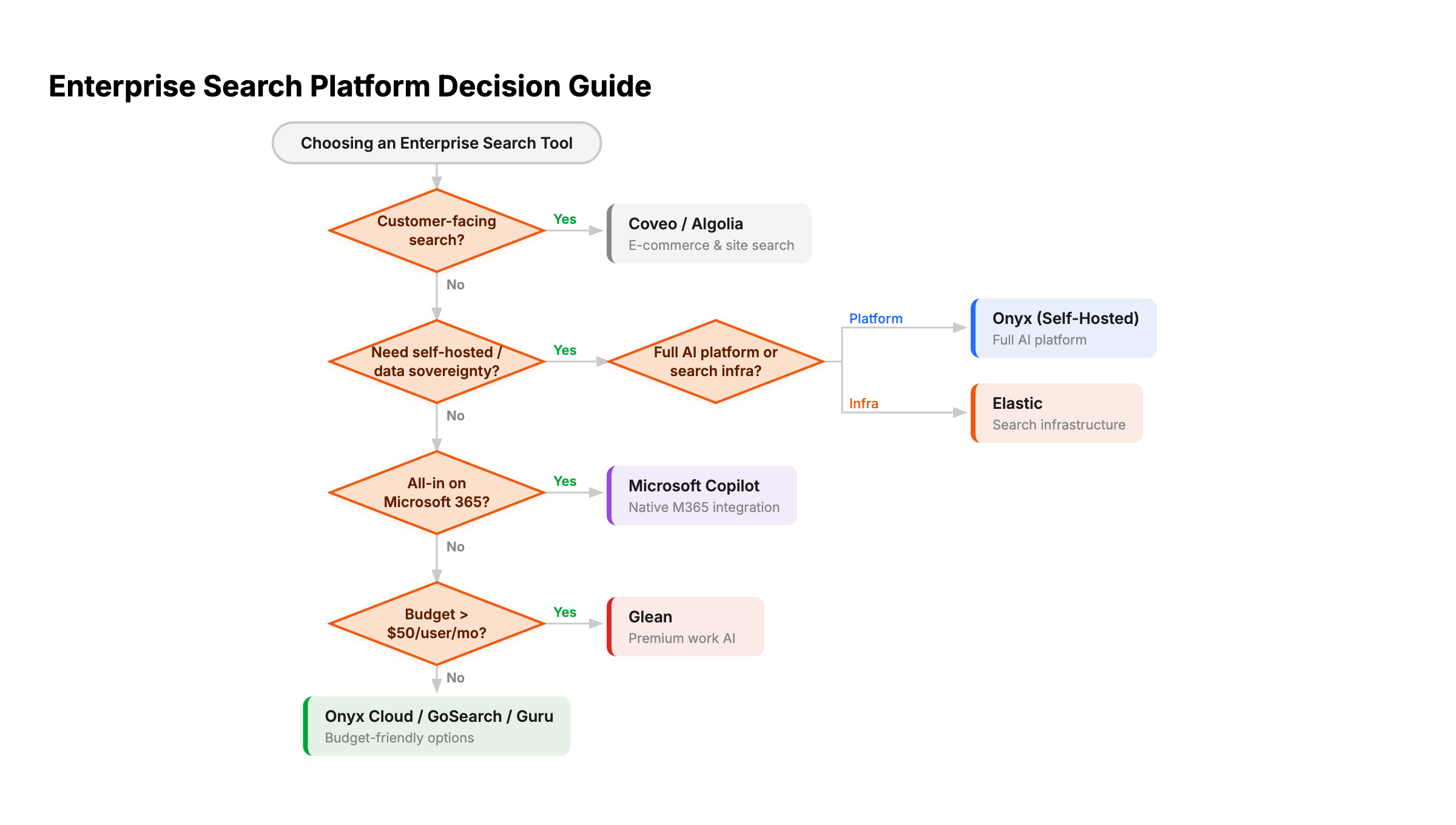
How to Choose: A Decision Framework
Most organizations start by asking: do we need a standalone search tool, or a full AI platform that includes search? That answer narrows the field quickly.
Choose Onyx if:
- You want search, AI chat, deep research, and custom agents in one platform instead of stitching together point solutions
- You need self-hosted or air-gapped deployment on any infrastructure: Docker, Kubernetes, or fully disconnected environments (regulated industries, data sovereignty, ITAR, GDPR)
- You want full control over your AI stack: choose any LLM, build custom connectors to internal systems, and modify the platform to fit your workflows
- Open-source auditability matters to your security or procurement team
- Your team uses a mix of tools across ecosystems (not all-in on Microsoft or Google)
- You want a free, fully functional community edition to evaluate before committing
Choose Glean if:
- You are a large enterprise (1,000+ employees) with budget for premium tooling
- You need the broadest connector library (100+) without building custom integrations
- Cloud or vendor-managed on-premises deployment is acceptable (Glean now offers on-prem via Dell and Cloud-Prem options)
- You want the most refined, turnkey experience with enterprise sales support
Choose Microsoft Copilot if:
- Your organization is 100% Microsoft 365: SharePoint, Teams, Outlook, Word, Excel
- You want AI embedded directly inside the apps your team already uses
- You are okay with the combined cost ($50+/user when including the M365 base license)
Choose Elastic if:
- You have an engineering team that wants to build custom search infrastructure
- You need full control over indexing, ranking, and relevance tuning
- You don't need a ready-made AI chat interface or SaaS connectors
Choose Coveo or Algolia if:
- Your primary use case is customer-facing search (e-commerce, support portals, websites)
- Internal, knowledge base search isn't the priority
Recommended Enterprise Search Setup
| Team profile | Recommended setup | Why |
|---|---|---|
| Startup or small team | Onyx Cloud with Slack, Drive, and docs connectors | Quickest path to useful internal answers |
| Mid-market organization | Onyx Cloud or self-hosted with SSO, permission sync, and department agents | Balances adoption, governance, and cost |
| Microsoft-only enterprise | Evaluate Copilot and Onyx side by side | Copilot wins inside M365, Onyx wins across mixed stacks |
| Regulated enterprise | Onyx Enterprise self-hosted or air-gapped | Keeps data processing and model calls under your controls |
Start with the sources employees search most often, not every connector the vendor supports. Search quality and permissions on the top five systems matter more than a long connector list nobody uses.
Recommendation
Enterprise search in 2026 is about getting answers from your company's knowledge. The best enterprise search tools are the ones that connect to where your data actually lives, respect who can see what, and deliver AI-powered answers you can trust.
The biggest divide in the market is no longer just deployment model; it is whether your search tool stops at search, or extends into AI chat, deep research, and agents grounded in your company data. Glean offers convenience, broad connectors, and now vendor-managed on-premises deployment. But Onyx is the only tool on this list that delivers the full stack: enterprise search, multi-model AI chat, deep research, and custom agents with tool use, in one open-source platform you can deploy on any infrastructure, customize to your needs, and run with any LLM including fully local models.
For most organizations evaluating enterprise search in 2026, Onyx offers the best combination of capabilities, flexibility, and value. Start with what you actually need: just search, or search plus AI capabilities? Then evaluate deployment model, connectors, and pricing. Run a proof-of-concept with your actual data; that is where the real differences show up.
Try Onyx for free and connect your first data source in under 30 minutes, or book a demo to see how it fits your team.
Frequently Asked Questions
What is the difference between enterprise search and ChatGPT Enterprise?
Enterprise search platforms build a persistent index of your company's documents and retrieve from it using hybrid search. ChatGPT Enterprise has added partial indexing for a few connected sources (Google Drive, GitHub, SharePoint), but its coverage is narrow compared to purpose-built platforms that index 40-100+ sources with deep permission inheritance. For teams that need comprehensive search across many tools, a dedicated enterprise search platform will deliver better retrieval quality.
Is there an open-source enterprise search tool?
Yes. Onyx is the leading open-source enterprise search platform, licensed under MIT. It can be self-hosted with Docker or Kubernetes and supports any LLM. Elastic (AGPL license) provides open-source search infrastructure but requires significant development to build an enterprise search experience.
Can enterprise search tools work in air-gapped environments?
Most enterprise search tools are cloud-only. Onyx is the only platform in this guide that supports fully air-gapped deployment with local LLMs and zero internet connectivity, making it suitable for defense, aerospace, and other high-security environments.
What is RAG?
RAG (retrieval-augmented generation) is the architecture that powers modern enterprise search. Instead of relying solely on an LLM's training data, RAG retrieves relevant documents from your company's indexed data and feeds them to the model at query time, producing answers grounded in your actual internal knowledge.
Related Insights
How Onyx's RAG Engine Cuts Token Usage at Enterprise Scale (2026)
Agents that read every source burn tokens on every task. Learn how Onyx's RAG engine indexes your sources once, condenses them into a vector DB, and serves enterprise context in one cheap retrieval call.

Self-Hosted RAG in 2026: The Complete Guide to Running Retrieval-Augmented Generation On Your Own Infrastructure
How to deploy retrieval-augmented generation on your own infrastructure. Compare self-hosted RAG platforms (Onyx, Open WebUI, LibreChat, AnythingLLM, RAGFlow, Verba) and frameworks (LlamaIndex, LangChain, Haystack), with recommended stacks for small, mid-market, and air-gapped enterprise deployments.
Best Enterprise RAG Platforms for 2026: A Buyer's Guide
Compare 11 enterprise RAG platforms across architecture, connectors, deployment, security, and pricing. Includes turnkey, cloud, and open-source options with current 2026 pricing and analyst data.